

Script fonts can instantly transform a Cricut project, giving it elegance, personality, and a handcrafted feel. However, not every beautiful script font is well suited to a cutting machine.
Some fonts look stunning on your screen but become frustrating once they’re imported into Cricut Design Space. Thin connectors, excessive flourishes, and intricate details can make projects more difficult to weed and may not produce the clean results you’re hoping for.
As a printables designer, I spend a lot of time working with typography and building a carefully curated font library. Over the years, I’ve learned that the right script font isn’t just about appearance. Good letter spacing, balanced stroke widths, and thoughtful design all play an important role in creating successful projects.
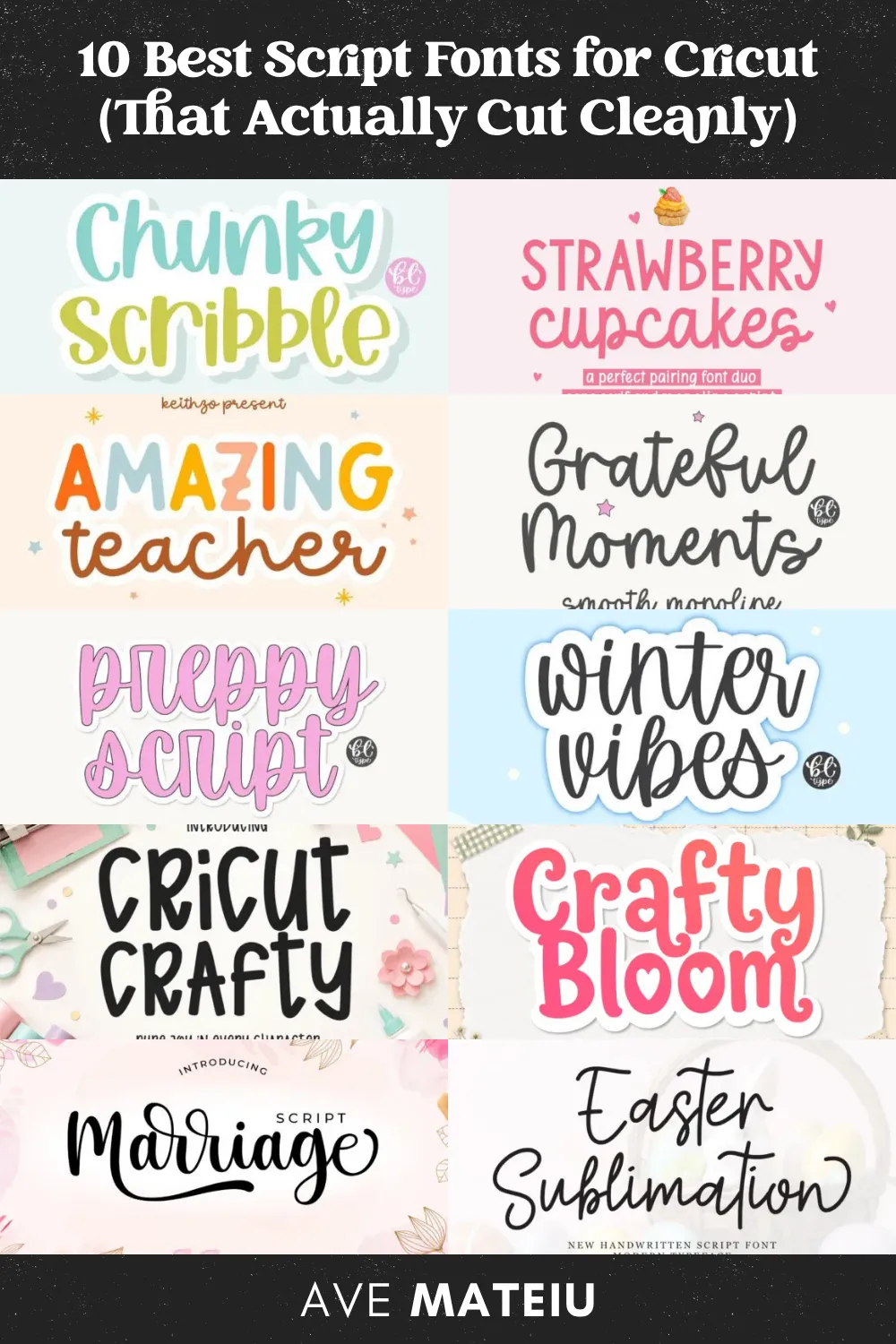
For this article, I selected the best script fonts for Cricut based on their overall design quality, readability, and characteristics that make them well suited to cutting projects. Some are bold and beginner friendly, while others offer a more elegant handwritten style.
Rather than selecting the most decorative fonts I could find, I focused on fonts that balance style with practicality.
I also wanted to include a variety of styles. Whether you’re creating wedding signs, vinyl decals, mugs, labels, greeting cards, or personalized gifts, you’ll find fonts for different crafting styles and occasions.
This article contains a curated selection of products that my team and I think you’ll love. We may earn a commission if you choose to join Creative Fabrica, but it won’t cost you anything extra.
Why Some Script Fonts Are Easier to Cut Than Others
It’s easy to assume that every script font will work well with a Cricut, but that’s not always the case. While many fonts look beautiful on screen, some are simply better suited to cutting projects than others.
When I’m evaluating a script font, these are the four things I pay the most attention to.
Are the letter connections sturdy?
One of the first things I look at is how the letters connect. Fonts with very thin connectors can become more challenging to work with, especially on smaller designs. Slightly thicker, well-defined connections generally create cleaner, more reliable results.
Does it have a lot of flourishes?
Long swashes and intricate loops can add elegance, but they also make a design more complex. While they look beautiful on large signs or statement pieces, simpler script fonts are often a better choice for smaller Cricut projects.
Are the letterforms open and readable?
I also pay attention to the counters, which are the enclosed spaces inside letters like a, e, o, and r. Fonts with larger, more open letterforms are generally easier to weed and remain readable across a wider range of sizes.
Is the stroke width consistent?
Finally, I look at the overall stroke width. Script fonts with a consistent, medium-weight stroke usually strike the best balance between elegance and practicality. Fonts with dramatic shifts between very thin and very thick lines may look beautiful but often require a little more care.
The Best Script Fonts for Cricut are:
Best Bold Script Fonts for Beginners
1/10
Chunky Scribble Font

Why I picked it
Chunky Scribble is one of the most beginner-friendly fonts in this collection. Its thick, rounded letterforms are easy to read and have a fun, handcrafted personality that works beautifully for everyday Cricut projects.
Best for:
- Vinyl decals
- Kids’ t-shirts
- Water bottles
- Tote bags
What to know
Its bold design stands out best on medium to large projects where you want the lettering to be playful and eye-catching.
Estimated Weeding Difficulty
⭐⭐☆☆☆ Easy (2/5)
2/10
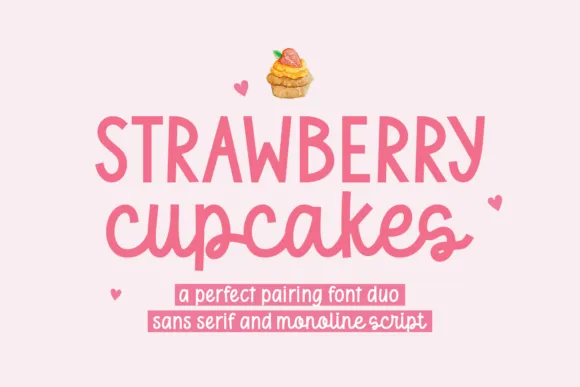
Strawberry Cupcakes Duo Font
Why I picked it
Strawberry Cupcakes includes both a playful script and a clean sans serif, giving you plenty of flexibility when designing matching projects. I like having both styles available because they pair naturally without needing to search for a second font.
Best for:
- Kitchen labels
- Birthday decorations
- Gift tags
- Vinyl decals
What to know
The sans serif is especially beginner friendly, while the script works best at medium or larger sizes where its connected lettering has room to shine.
Estimated Weeding Difficulty
⭐⭐☆☆☆ Easy (2.5/5)
3/10
Amazing Teacher Duo Font

Why I picked it
Amazing Teacher combines a cheerful handwritten script with a versatile sans serif, making it a great choice for personalized gifts and classroom-themed projects. The overall style feels warm, welcoming, and easy to customize.
Best for:
- Teacher gifts
- Classroom signs
- Tote bags
- Storage labels
What to know
Both fonts have simple letterforms that should work well across a variety of Cricut projects without looking overly decorative.
Estimated Weeding Difficulty
⭐⭐☆☆☆ Easy (2.5/5)
Best Monoline Script Fonts for Cricut
4/10
Grateful Moments Font

Why I picked it
Grateful Moments has a clean monoline style that feels elegant without becoming overly delicate. Its smooth, consistent lettering gives it a timeless look that’s suitable for many different projects.
Best for:
- Journal covers
- Inspirational quotes
- Home décor
- Personalized gifts
What to know
If you like modern handwritten fonts with minimal flourishes, this is a beautiful option to consider.
Estimated Weeding Difficulty
⭐⭐⭐☆☆ Moderate (3/5)
5/10
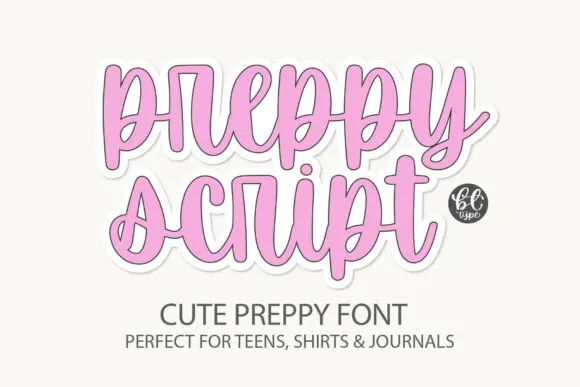
Preppy Script Font
Why I picked it
Preppy Script has a fresh, modern style with smooth letter connections and a relaxed feel. It’s the kind of font that works well for both everyday crafts and more polished personalized projects.
Best for:
- Stanley tumblers
- Boutique branding
- Hoodies
- Vinyl decals
What to know
Its connected lettering makes it a good candidate for welded script designs in Cricut Design Space.
Estimated Weeding Difficulty
⭐⭐☆☆☆ Easy (2.5/5)
6/10
Winter Vibes Font

Why I picked it
Winter Vibes brings a casual handwritten look that’s perfect for seasonal projects. The flowing curves give it plenty of personality without making it feel overly formal.
Best for:
- Christmas décor
- Ornaments
- Holiday mugs
- Throw pillows
What to know
Some of the decorative loops are slightly finer than the rest of the lettering, so larger sizes may be easier to work with.
Estimated Weeding Difficulty
⭐⭐⭐☆☆ Moderate (3/5)
Best Fonts Designed for Crafters
7/10
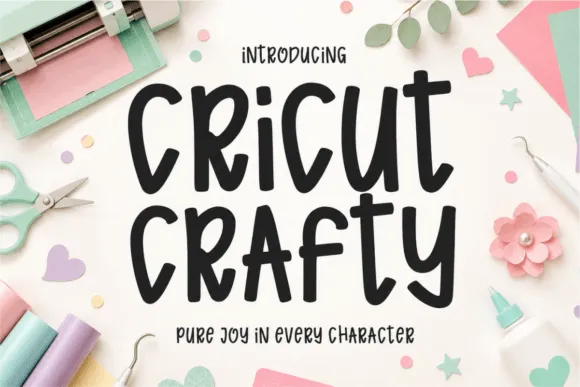
Cricut Crafty Font
Why I picked it
As the name suggests, Cricut Crafty was created with crafters in mind. Its smooth handwritten style is simple, readable, and versatile enough for a wide range of DIY projects.
Best for:
- Signs
- Multi-word quotes
- Vinyl decals
- Personalized gifts
What to know
If you’re looking for a dependable everyday script font, this is one of the most versatile options in the collection.
Estimated Weeding Difficulty
⭐⭐☆☆☆ Easy (2/5)
8/10
Crafty Bloom Font

Why I picked it
Crafty Bloom combines chunky lettering with playful decorative details, creating a font that feels handmade without becoming difficult to read. The small heart accents add extra charm to themed projects.
Best for:
- Mother’s Day gifts
- Makeup bags
- Wood signs
- Valentine’s crafts
What to know
The decorative details make this font especially fun for larger designs where they can be fully appreciated.
Estimated Weeding Difficulty
⭐⭐⭐☆☆ Moderate (3.5/5)
Best Elegant Script Fonts for Weddings
9/10
Marriage Script Font

Why I picked it
Marriage Script offers the elegance of classic calligraphy while maintaining clear, readable letterforms. It’s a lovely choice for formal occasions where you want a sophisticated handwritten look.
Best for:
- Wedding signs
- Acrylic plaques
- Champagne flutes
- Bridal shower décor
What to know
The decorative swashes add elegance but may require a little more attention when working with smaller designs.
Estimated Weeding Difficulty
⭐⭐⭐☆☆ Moderate (3/5)
10/10
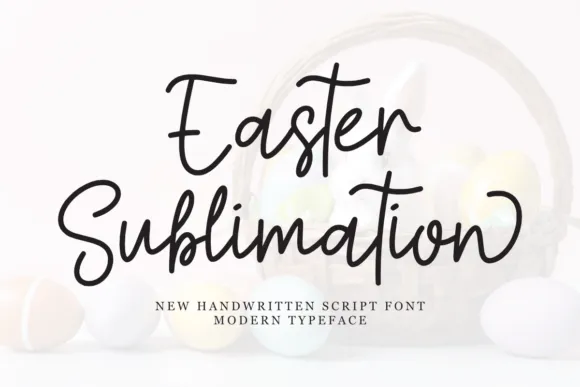
Easter Sublimation Font
Why I picked it
Despite its name, this font isn’t limited to Easter projects. Its graceful handwritten style makes it suitable for everything from nursery décor to personalized gifts throughout the year.
Best for:
- Greeting cards
- Tumblers
- Bedroom décor
- Vinyl stickers
What to know
Its flowing curves create a refined look that’s especially well suited to medium and larger Cricut projects.
Estimated Weeding Difficulty
⭐⭐⭐☆☆ Moderate (3.5/5)
How to Add Fonts to Cricut Design Space
If you’re new to Cricut, adding fonts is surprisingly straightforward.
- Download, extract and install the font on your computer.
- Windows: Right-click the .ttf or .otf file and click Install for all users (or Install).
- Mac: Double-click the font file to open the Font Book, then click Install Font.
- Close Design Space if it’s currently open.
- Reopen Design Space after installation.
- Create a new project.
- Select the Text tool.
- Click the Font dropdown, and select the System tab.
- Search for your newly installed font.
Once selected, the font will be available for use in your designs.
Keep in mind that some script fonts may require the Weld tool to properly connect letters before cutting.
Tips for Better Results
Even the best font can produce disappointing results if the design isn’t prepared correctly:
- Always weld connected script fonts before cutting.
- Increase the size if lettering feels too delicate.
- Use an offset when you want a slightly bolder appearance.
- Do a small test cut before starting larger projects.
- Replace dull blades regularly for cleaner cuts.
Where I Find Most of My Fonts
People often ask where I find the fonts I use in my printable designs.
Most come from Creative Fabrica because I enjoy having access to a large library rather than purchasing fonts individually. It also makes it easier to explore different styles when designing planners, party games, and other printable products.
If you’re building your own font collection, it’s a practical resource worth exploring.
Whether you’re creating personalized gifts, wedding décor, labels, or vinyl decals, the right font can make a noticeable difference in the finished result.
I hope this collection gives you a few new favorites and helps you choose script fonts with greater confidence for your next Cricut project.
xxAve
Frequently Asked Questions
What is a good script font for Cricut?
A good script font for Cricut should have smooth connections, clear letterforms, and enough thickness to cut cleanly. Fonts with moderate flourishes and strong readability tend to produce the best results.
What script fonts cut best on Cricut?
Some of the best script fonts for Cricut are those with smooth letter connections, moderate stroke thickness, and clean curves. Fonts like Chunky Scribble, Grateful Moments, Preppy Script, and Cricut Crafty are excellent choices because they’re easy to read and produce clean cuts on a variety of materials.
Can I add my own fonts to Cricut Design Space?
Yes. Any font installed on your computer can typically be accessed through the System fonts section in Cricut Design Space. For step-by-step instructions, see my guide on How to Add Fonts to Cricut Design Space.
Are free script fonts good for Cricut?
Some free script fonts work very well, while others may have thin strokes, overly intricate flourishes, or uneven spacing that can make cutting more difficult. Always test a font before using it on an important project.
In many cases, yes. Premium fonts often have cleaner curves, better spacing, and more consistent letter connections than free alternatives. That usually means fewer editing steps in Cricut Design Space and cleaner cuts, especially for script fonts.
Yes. If you’re new to Creative Fabrica, you can claim up to 10 free font downloads during the trial, making it easy to try premium-quality script fonts for your Cricut projects before deciding whether to continue with a membership.
Why is my script font cutting incorrectly?
Common causes include forgetting to weld connected letters, choosing fonts with very thin strokes, cutting at extremely small sizes, or using incorrect material settings. You can learn more about the most common Cricut cutting issues in this troubleshooting guide.
EXPLORE MORE CURATED TYPOGRAPHY COLLECTIONS:
PIN IT FOR LATER 📌
Leave a comment